
We Bought Copilot.

Updated: Mar 28
That's Not the Same as Governing It.

FWS Ethical AI Series — Shadow AI in Your Tech Stack, Part 3
By Holly Hartman | Future Workforce Systems
A family member who works in software development at a major enterprise told me recently that Microsoft has been rolling out Copilot and agent training across their organization. Thorough. Well-designed. Employees are learning the features and finding genuine value — the GitHub integration alone has changed how developers work.
Microsoft is doing their part.
Here's the question nobody in that training room is likely being asked: before Copilot was switched on, did anyone audit what it could already see?
Because Copilot doesn't create new data risks. It illuminates every data governance failure your organization has accumulated over the last decade — and makes all of it searchable in plain English. Today.
This is Part 3 of the FWS Shadow AI in Your Tech Stack series. Parts 1 and 2 covered the AI hiding inside tools your organization chose to deploy — notetakers and CRM platforms. This one is different. Microsoft 365 is the suite almost every enterprise already runs. And most organizations have no idea what the AI now running inside it can find.
The Platform You Approved Is Not the Platform Running Today
When most organizations purchased Office 365 or Microsoft 365, they were buying a productivity suite — documents, email, calendars, and collaboration. A tool that waited for humans to tell it what to do.
That tool no longer exists. The platform still has the same contract line item and the same login screen. But AI is now embedded across Word, Excel, PowerPoint, Outlook, Teams, SharePoint, OneDrive, Loop, Viva, and more — and many of these features arrived via standard update cadence, not a new purchase, not a procurement review, and not a governance trigger.
There is also a distinction most organizations haven't made — and that was raised explicitly at Louisville AI Week 2026 as an underaddressed risk: free Microsoft Copilot and enterprise Microsoft 365 Copilot share a name and share an interface, but they do not share data terms.
The free consumer version — available through Bing, Edge, and Windows on personal Microsoft accounts — operates under consumer privacy terms. Microsoft announced in August 2024 that it would begin using consumer Copilot interactions, including conversation data, to train its models by default. The enterprise version — Microsoft 365 Copilot — operates under the Online Services Terms, where customer data is not used to train foundation models.
Most employees cannot tell the difference. And most organizations haven't told them. An employee who uses free Copilot at home, or switches to their personal Microsoft account on a work device, may be operating under consumer terms — pasting proprietary content into what they believe is their company's governed AI environment.
The scale of deployment makes this urgent. Microsoft 365 Copilot reached 15 million seats by early 2026, growing tenfold year over year, with nearly 33 million active users across surfaces. Most of those seats were deployed into environments that were never audited for what Copilot would be able to find.
What Copilot Can Actually See
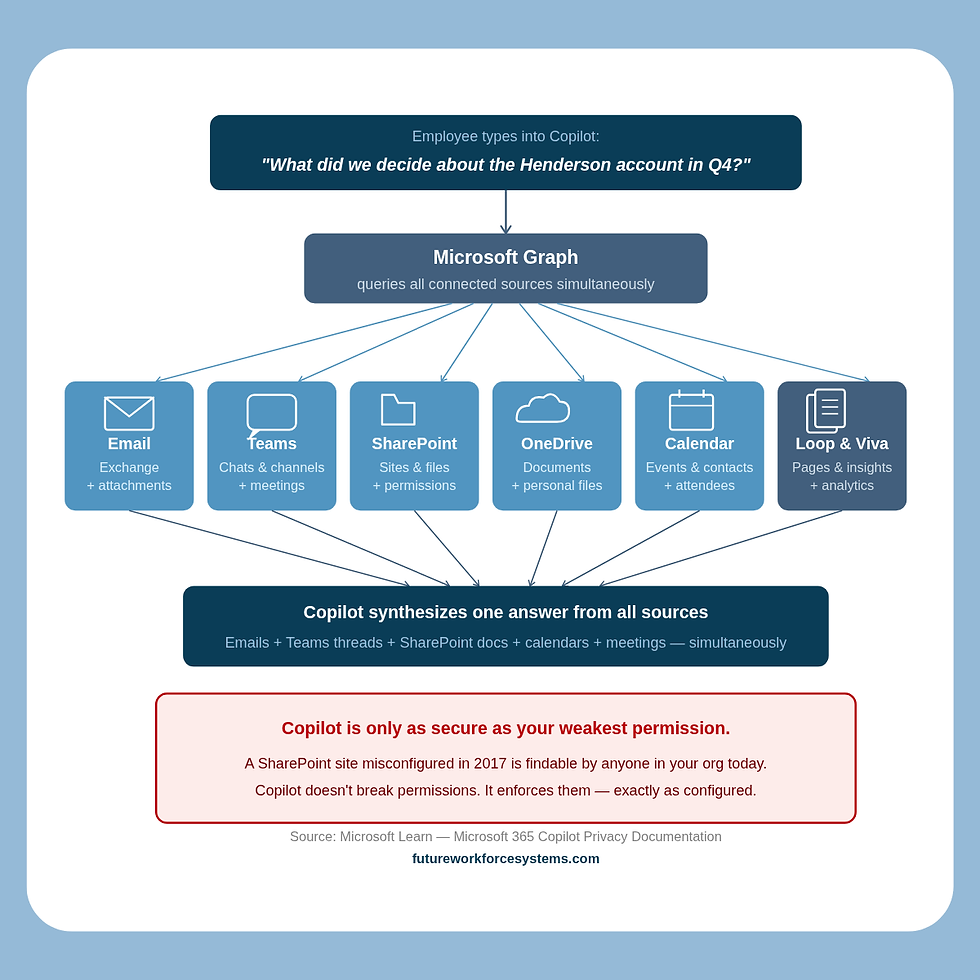
Microsoft 365 Copilot accesses data through Microsoft Graph — which means it can reach emails and attachments in Exchange, documents in SharePoint and OneDrive, Teams chats and channel messages, meeting transcripts and recordings, calendar events and contacts, Loop pages, and Viva content. All of it. Simultaneously.
It doesn't just search — it synthesizes. A user can ask "what did we decide about the Henderson account last quarter" and Copilot pulls from emails, meeting transcripts, and SharePoint documents at once to construct an answer. That's not a search engine. That's a cross-workspace intelligence layer sitting on top of everything your organization has ever created or stored in Microsoft's cloud.
Microsoft is clear that Copilot respects existing permissions — it does not override access controls. But that is precisely where the risk lives. Because Copilot surfaces everything those permissions allow, including files that were technically accessible but practically invisible for years.
The experience of discovering this for the first time is documented in real enterprise environments. In January 2026, a civil engineer posted about discovering that Copilot had access to every file, every email, every SharePoint site, every Teams channel, and every calendar entry in their organization — with no opt-out. The post drew hundreds of responses from IT professionals who confirmed the experience and urged immediate permissions audits.
One commenter captured the risk precisely:
"Copilot doesn't extend any permissions — but it might make things that they shouldn't be able to see easier to find."
That is the entire governance conversation in one sentence.
In February 2026, a documented bug — Issue ID CW1226324 — showed Copilot referencing sensitive emails despite confidential labels and DLP policies being in place. Organizations didn't discover it until Microsoft disclosed it weeks later.
Security teams were completely blind to what had been surfaced in the interim.
And perhaps most alarming: early adopters in enterprise environments have begun deliberately stress-testing Copilot by typing sensitive search terms — "executive compensation," "HR records," "M&A due diligence" — to see what surfaces.
The results have confirmed what security vendors have been warning about for two years: board-level documents, executive salary data, and confidential project files are findable in seconds by any employee whose permissions technically allow access — whether or not anyone intended those files to be findable.
The Overpermissioning Problem Nobody Wants to Own
Most enterprise Microsoft 365 environments carry years of accumulated governance debt. SharePoint sites misconfigured in 2017. "Everyone except external users" permissions never cleaned up. Broadly shared drives. Files that were technically accessible to hundreds of people but practically invisible because nobody knew where to look.
Before Copilot, that governance debt was largely invisible. The files existed but were buried. Nobody could easily find them through manual navigation.
After Copilot, a new employee types a plain English question and gets back board-level M&A documents, executive compensation data, or confidential HR files — because a legacy SharePoint permission from years ago was never reviewed. Copilot didn't break anything. It enforced your permissions exactly as configured. The problem is that your permissions were never right to begin with.
15%+ of business-critical files at risk from oversharing | 90% of business-critical docs shared outside the C-suite | 83% of at-risk files overpermissioned internally | 17% overshared to external third parties |
These numbers come from Concentric AI's 2025 analysis of Microsoft 365 environments — and they describe the baseline state of most enterprise tenants before Copilot was ever enabled.
Microsoft itself has implicitly acknowledged the scale of the problem. They ship "Content Management Assessment" and "Permission State Reports" directly inside Copilot licenses — cleanup tools built into the product because they know how bad most tenants are. They also released an Automated Readiness Assessment tool in 2026 specifically to help organizations find the governance gaps that manual audits were missing — because manual audits were rarely being done at all.
Zscaler describes it plainly: Copilot is "saying the quiet part out loud." You didn't give Copilot new access. You gave it a voice — and it's saying everything your permissions were quietly allowing all along.
The 94/6 Problem — Why Most Organizations Are Stuck
Here is the statistic that should be in every board presentation about Copilot:
94% report pilot benefits | 6% completed global rollout | 72% stuck in pilots due to governance |

These numbers come from a Gartner survey of 215 IT leaders conducted in June 2025. Nearly every organization that has piloted Copilot sees the value. Almost none have governed it well enough to deploy it broadly.
A separate Gartner survey of 132 IT leaders found that 40% delayed Copilot rollout three or more months specifically over oversharing concerns, and 64% needed major information governance work before they could proceed.
The pre-deployment steps Microsoft recommends — permissions review, SharePoint hygiene, sensitivity labeling, DLP configuration, sharing policy configuration, and monitoring setup — have been completed by the vast majority of organizations after enabling Copilot, not before. Research shows fewer than 36% have completed even basic permissions hygiene. Most turned it on first and planned to govern it later. Many are still planning.
There is also a financial structure worth understanding. Microsoft's partner channel offers 18.25% rebates on Copilot seat sales with no governance mandate attached. Partners are financially incentivized to deploy Copilot at volume — and there is no certification, checklist, or readiness requirement that must be met before a customer goes live. The incentive is to sell seats, not to govern them.
The cost of this gap is measurable. Organizations with governance maturity get 26% value from Copilot. Ungoverned deployments get 3%. The license cost is identical. The difference is entirely governance.
You didn't buy an AI assistant. You bought a semantic search engine pointed at a decade of ungoverned data — and most organizations are paying full price to use 3% of it safely.
Copilot Studio and the Agent Layer
The conversation above is about Copilot as an assistant — a tool that helps employees find, draft, and summarize. That conversation is already urgent. But there is a second conversation happening simultaneously that most governance frameworks haven't caught up to yet.
Copilot Studio lets business users — not just IT — build agents that can send emails, update records, trigger workflows, query databases, and interact with external systems. Under permissive policies, a marketing manager, a finance analyst, or an operations lead can create an agent in Copilot Studio without any IT review or approval.
In November 2025, Microsoft introduced Agent 365 as a tenant-level control plane for discovering, cataloging, and governing agents at scale — integrated with Microsoft Entra, Defender, and Purview. That tooling exists because the problem it solves already exists: agents being built and deployed across organizations without central visibility or governance.
The shadow AI dynamic from Parts 1 and 2 of this series has now arrived inside Microsoft's own ecosystem. Employees are building agents inside the tools your organization officially approved — and IT may have no idea they exist, what data they can access, or what actions they can take without human review.
If you haven't governed Copilot as an assistant yet, you are not ready for Copilot as an agent.
The Developer Dimension — Your Codebase Is Also at Risk
Most Copilot governance conversations focus on knowledge workers — the people using Outlook, Teams, and SharePoint. There is a parallel conversation happening in developer environments that most governance frameworks completely miss.
GitHub Copilot and Microsoft 365 Copilot are separate products, but they coexist inside the same enterprise Microsoft ecosystem. GitHub Copilot can access proprietary code repositories, commit history, infrastructure configurations, internal wikis, and any API keys or secrets accidentally left in repositories. The same semantic search capability that makes Copilot powerful for knowledge workers makes GitHub Copilot powerful — and potentially risky — for developers.
Surveys consistently show developers are significantly more likely than knowledge workers to use personal AI tools due to a “productivity first” culture. Shadow GitHub Copilot — personal accounts used on work codebases — is almost certainly already present in your organization, completely outside IT’s visibility.
There is also a retention gap most developers have never been told about: IDE prompts vanish immediately, but chat logs persist for 28 days — and feedback data persists for two years. Most developer governance conversations have never happened, let alone addressed these specifics.
The admin center controls that govern Microsoft 365 do not automatically extend to GitHub unless enterprise policies were explicitly configured. Most organizations haven't done this.
Microsoft 365 Copilot can surface your documents. GitHub Copilot can surface your source code. Both deserve governance. Most organizations have started neither.
Three Sets of Questions to Ask Right Now
Questions to ask yourself as a leader
Do I know which Copilot features are currently active across our M365 tenant — including features that arrived via standard updates without a procurement review?
Has anyone audited our SharePoint permissions, OneDrive sharing settings, and Teams channel access since Copilot was enabled?
Do we have sensitivity labels and DLP policies configured — or did we enable Copilot first and plan to govern it later?
Do our employees know the difference between free consumer Microsoft Copilot and enterprise Microsoft 365 Copilot — and which one governs how their data is handled?
Has our legal team reviewed what Copilot can access in the context of our confidentiality obligations and client contracts?
Do we have GitHub Copilot in our environment — and if so, is it on enterprise licensing with admin controls or personal accounts?
Questions to ask your IT and security teams
Have we run a SharePoint permissions audit since Copilot was enabled — and do we know what a new employee could find if they typed sensitive search terms into Copilot today?
Are we logging Copilot queries and monitoring for anomalous access patterns?
Have we configured Copilot Studio policies to restrict who can build and publish agents in our tenant?
Has anyone stress-tested our environment by deliberately searching for sensitive content — executive compensation, M&A files, HR records — to see what surfaces?
Do we know whether employees are using personal Microsoft accounts to access Copilot on company devices or with company data?
Questions to ask your Microsoft partner or IT admin
What data readiness steps did we complete before Copilot was enabled in our tenant?
Which AI features are currently active in our tenant by default — including features that arrived via platform updates in the last 24 months?
What are our current sensitivity label coverage rates across SharePoint and OneDrive?
What agent policies are currently configured in Copilot Studio — and who in our organization can create and publish agents without IT approval?
Can you run the Automated Readiness Assessment report and show us the current gaps?
Governance Is the Organization's Job
Microsoft is doing their part. The training is real, thorough, and well-designed. The tools are genuinely powerful. The GitHub integration is changing how developers work. The productivity case for Copilot is not in question.
What Microsoft cannot do:
Clean up your 2017 SharePoint permissions.
Write your acceptable use policy. Decide which meetings should never be summarized by AI.
Define which repositories should be excluded from Copilot indexing.
Govern the agents your business users are building in Copilot Studio.
Explain to your employees the difference between consumer and enterprise Copilot data terms.
That is organizational work. That is leadership work.
And the data is clear: most organizations have bought the license and skipped the governance.
Three things any leader can do this week:
Run a SharePoint permissions audit — before anyone else types "executive compensation" or "HR records" into Copilot and finds something they were never meant to find
Check your Copilot Studio policies — confirm who in your organization can build and publish agents, and whether any agents are already running without IT oversight
Communicate the consumer vs. enterprise distinction to your employees — make sure everyone using Copilot understands which version governs their data and why it matters
From guardrails to governance means not waiting for the audit finding, the data incident, or the employee who stumbles onto a board-level document to tell you what Copilot can already see. The permissions were already wrong. Copilot just made them visible.
This is Part 3 of the Shadow AI in Your Tech Stack series. Part 1 covered AI notetakers. Part 2 covered CRM AI features. Part 4 coming soon: the shadow AI hiding in your browser — the extensions your team installed in 30 seconds that are reading everything on their screen.
Holly Hartman is the founder of Future Workforce Systems (FWS), an AI governance and workforce readiness consultancy. FWS helps mid-to-large enterprises move from AI-anxious to AI-ready — and from guardrails to governance — always through an Ethical AI lens. Because how we adopt AI matters as much as whether we adopt it. Learn more at futureworkforcesystems.com.


Comments